External REST API
Read and write the same insights, signals, opportunities, and ideas you manage in the app over HTTPS with workspace API keys. Vendor connections (Zoom, Jira, Google Drive, and others) are covered in the integration guides; this reference is for HTTP paths, methods, and payloads.
Secure
Keys and scopes are managed in workspace Settings; revoke anytime.
Fast
JSON over HTTPS for automation and dashboards.
RESTful
Conventional resources and verbs so clients stay predictable.
Authentication
All API requests must include an Authorization header with your API key as a bearer token. You can manage your API keys in the Settings > API Keys section of your Zentrik workspace.
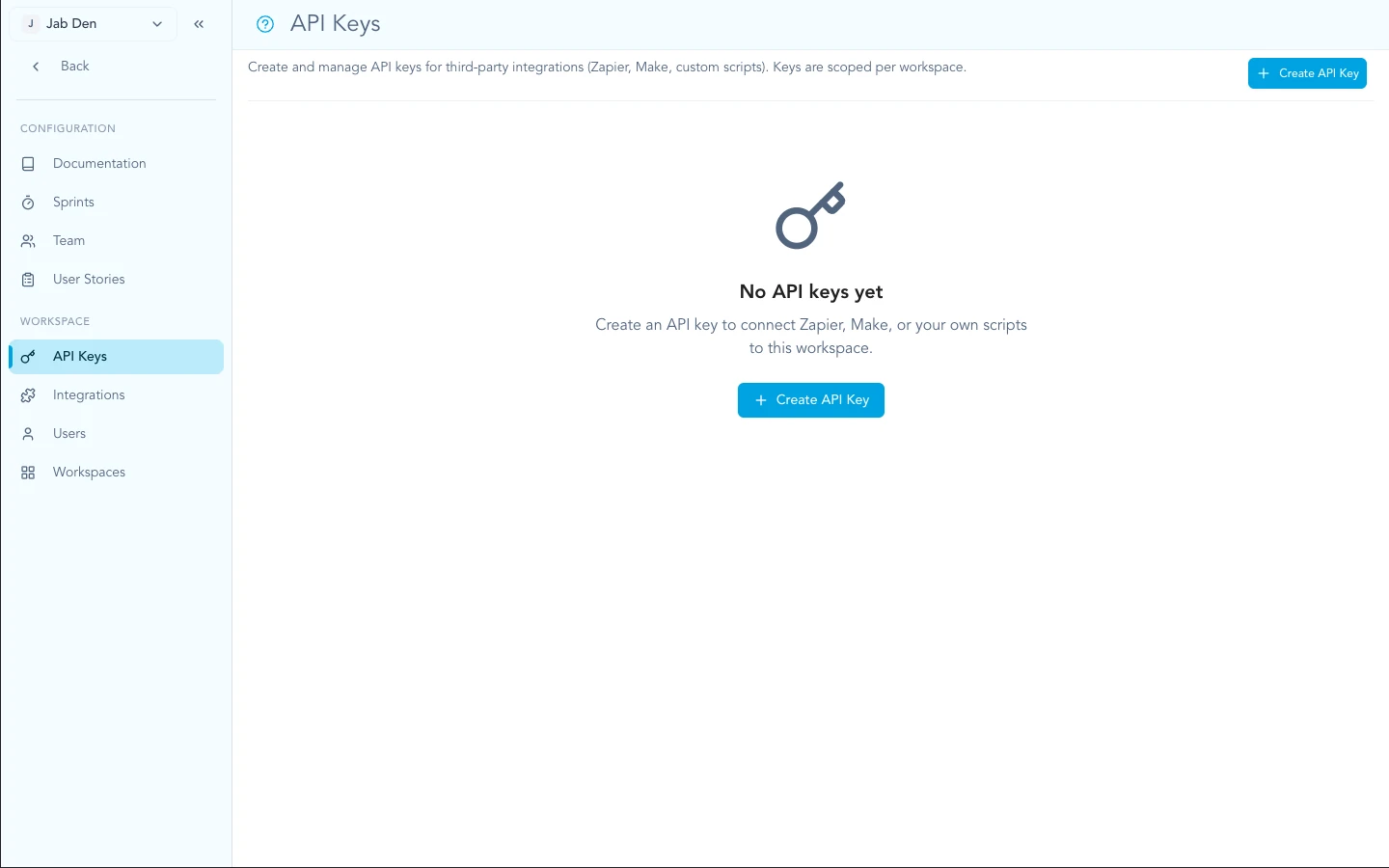
Create and manage keys from Settings → API keys in your workspace.
curl -H "Authorization: Bearer YOUR_API_KEY" \
  https://zentrik.com/external/v1/insights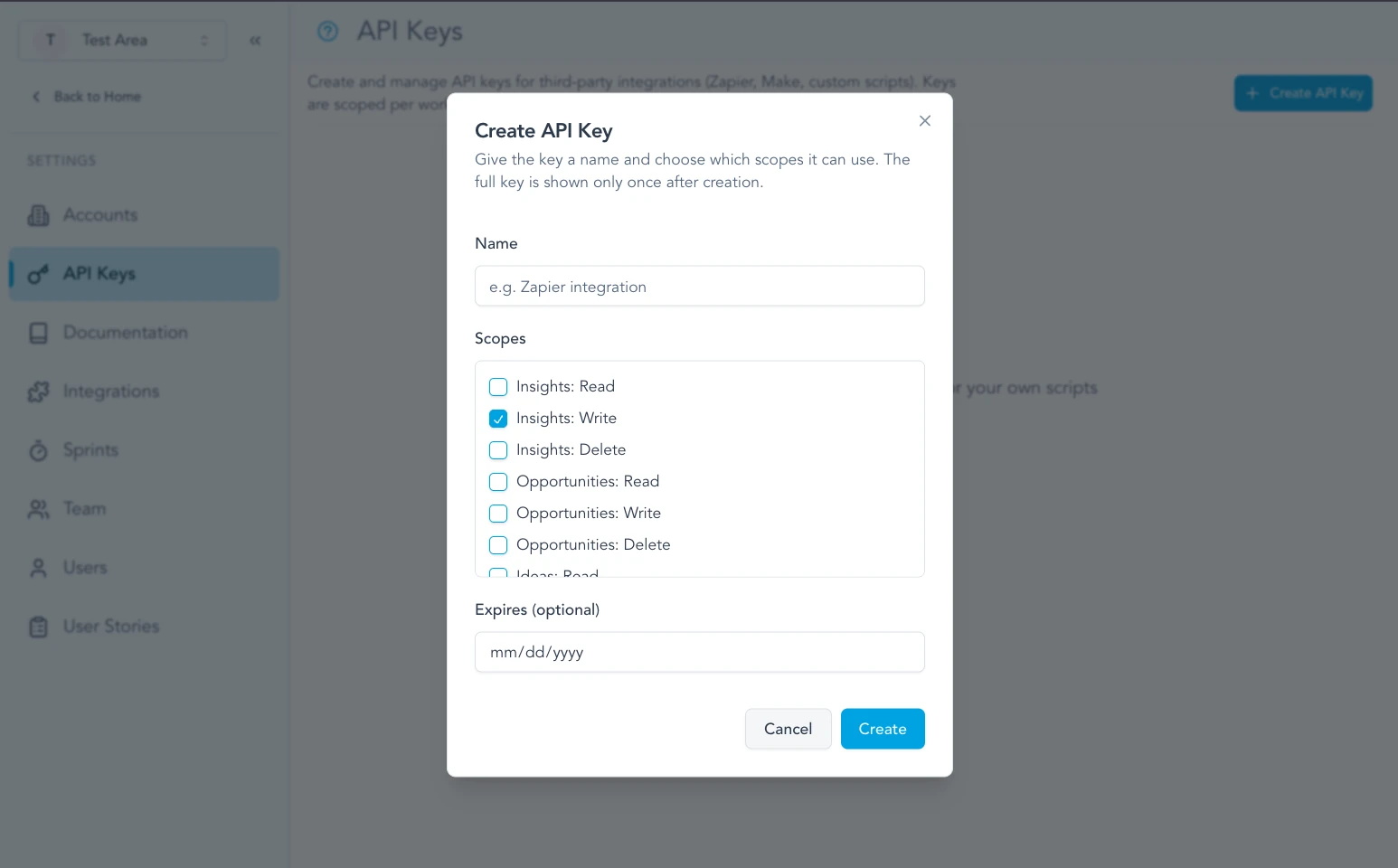
Each key can be limited to the API scopes your automation needs.
Keep your API keys secret. Do not share them or commit them to public repositories. If a key is compromised, revoke it immediately in the dashboard.
Signals
Signals are the imported transcripts, tickets, reviews, and reports that feed Discovery. Use these endpoints when you want to bring evidence into Zentrik from another source.
/external/v1/signals/external/v1/signals/:id/external/v1/signals/external/v1/signals/:id/external/v1/signals/:id/external/v1/signals/:id/processList all signals
List the signals in your workspace. Signals are imported pieces of customer or market evidence such as transcripts, support tickets, reviews, and discovery reports.
Requirements
Request
Parameters
| Name | Type | Description |
|---|---|---|
| limit | number | Maximum number of items to return (default: 20) |
| offset | number | Number of items to skip (default: 0) |
Responses
Signals were successfully retrieved.
Example Request
/external/v1/signalscurl -X GET https://api.zentrik.com/external/v1/signals?limit=10 \
-H 'Authorization: Bearer YOUR_API_KEY'Example Response
[
  {
    "id": "uuid",
    "name": "Support Ticket - 3/20/24, 10:00 AM",
    "publicId": "SIGNAL-42",
    "workspaceId": "workspace-uuid",
    "status": "processed",
    "context": "support_request",
    "signalType": null,
    "source": {
      "type": "support-ticket",
      "external_data": {
        "provider": "zendesk",
        "ticketId": "12345"
      }
    },
    "data": {
      "subject": "Users cannot reset password",
      "severity": "high"
    },
    "insightIds": [],
    "externalId": "external-123",
    "createdAt": "2024-03-20T10:00:00Z",
    "updatedAt": "2024-03-20T10:00:00Z"
  }
]Get one signal
Retrieve a single signal by its ID.
Requirements
Request
Parameters
| Name | Type | Description |
|---|---|---|
| id * | uuid | The unique identifier of the signal |
Responses
The signal was successfully retrieved.
No signal found with the provided ID.
Example Request
/external/v1/signals/:idcurl -X GET https://api.zentrik.com/external/v1/signals/uuid \
-H 'Authorization: Bearer YOUR_API_KEY'Example Response
{
  "id": "uuid",
  "name": "Support Ticket - 3/20/24, 10:00 AM",
  "publicId": "SIGNAL-42",
  "workspaceId": "workspace-uuid",
  "status": "processed",
  "context": "support_request",
  "signalType": null,
  "source": {
    "type": "product-analytics",
    "external_data": {
      "event": "checkout_abandoned"
    }
  },
  "data": {
    "sessionId": "session-123"
  },
  "insightIds": [
    "insight-uuid"
  ],
  "externalId": "external-123",
  "createdAt": "2024-03-20T10:00:00Z",
  "updatedAt": "2024-03-20T10:00:00Z"
}Create a signal
Create a new signal by sending the text you want Zentrik to analyze. This is the recommended public API flow for transcripts, support tickets, reviews, and discovery reports. Advanced raw signal bodies are also accepted on this same endpoint and are auto-queued.
Requirements
Request
Request body (application/json)
Optional display name for the signal. When omitted for typed text signals, Zentrik generates one from the signal type and timestamp.
The raw transcript, support ticket, review, or discovery report text that Zentrik should process into insights.
What kind of text you are sending. This determines how Zentrik processes the signal. New text signals are automatically queued for processing after creation.
Optional notes to help Zentrik interpret the text correctly. Use this for things like where the text came from, what batch it belongs to, or any lightweight analyst note. This is treated as supplemental context, not an instruction override.
Optional timestamp representing when the original signal happened. When provided, it is used as the signal creation timestamp for trend accuracy.
Optional list of products to narrow the product context used during processing.
Optional account to associate with insights created from a typed text signal.
Responses
The signal was successfully created and queued for asynchronous processing. Create responses include a queued job id.
Example Request
/external/v1/signals{
"name": "G2 Reviews - March Batch",
"text": "Users love the product overall, but several reviewers mention that exports are hard to find and slow to complete for large datasets.",
"signalType": "review",
"additionalContext": "Public review batch collected from G2 and Capterra.",
"occurredAt": "2025-03-11T14:30:00Z",
"productIds": [
"product-uuid-1"
],
"accountId": "account-uuid-1"
}Example Response
{
  "id": "uuid",
  "name": "Review - 3/11/25, 2:30 PM",
  "publicId": "SIGNAL-43",
  "workspaceId": "workspace-uuid",
  "status": "processing",
  "context": null,
  "signalType": "review",
  "source": {
    "type": "manual-text",
    "external_data": {
      "signalType": "review",
      "analysisProfile": "survey_response"
    }
  },
  "data": {
    "s3Key": "signals/manual-text/workspace-uuid/uuid.txt",
    "productIds": [
      "product-uuid-1"
    ],
    "accountId": "account-uuid-1",
    "additionalContext": "Public review batch collected from G2 and Capterra.",
    "uploadedAt": "2025-03-21T10:00:00Z"
  },
  "insightIds": [],
  "externalId": null,
  "createdAt": "2025-03-11T14:30:00Z",
  "updatedAt": "2025-03-21T10:00:00Z",
  "jobId": "job-123",
  "processing": {
    "lastJobId": "job-123",
    "startedAt": "2025-03-21T10:00:00Z",
    "processedAt": null,
    "failedAt": null,
    "lastError": null
  }
}Update a signal
Update fields of an existing signal, such as metadata or linked insights.
Requirements
Request
Parameters
| Name | Type | Description |
|---|---|---|
| id * | uuid | The unique identifier of the signal |
Request body (application/json)
Updated source descriptor for the signal.
Updated arbitrary context payload.
Replace the list of linked insight IDs.
Updated external record identifier.
Processing status for the signal.
Persisted signal context, such as user_interview or support_request.
Responses
The signal was successfully updated.
Example Request
/external/v1/signals/:idcurl -X PATCH https://api.zentrik.com/external/v1/signals/uuid \
-H 'Authorization: Bearer YOUR_API_KEY' \
-H 'Content-Type: application/json' \
-d '{"insightIds": ["insight-uuid"]}'Delete a signal
Permanently delete a signal from the workspace.
Requirements
Request
Parameters
| Name | Type | Description |
|---|---|---|
| id * | uuid | The unique identifier of the signal |
Responses
The signal was successfully deleted.
Example Request
/external/v1/signals/:idcurl -X DELETE https://api.zentrik.com/external/v1/signals/uuid \
-H 'Authorization: Bearer YOUR_API_KEY'Example Response
{
  "message": "Deleted"
}Process a signal
Queue signal processing for an existing signal. Use this for explicit re-runs or manual retries.
Requirements
Request
Parameters
| Name | Type | Description |
|---|---|---|
| id * | uuid | The public or external-facing identifier of the signal to process. |
Responses
The signal was queued for asynchronous processing.
Example Request
/external/v1/signals/:id/processcurl -X POST https://api.zentrik.com/external/v1/signals/SIGNAL-43/process \
-H 'Authorization: Bearer YOUR_API_KEY'Example Response
{
  "jobId": "job-456"
}
Creation Modes
The recommended public API flow is typed text ingestion. Sendtext andsignalTypeto create a manual signal that is automatically queued for AI processing into insights.
Supported signal types: transcript, support_ticket, review, discovery_report
Profile mapping: transcript → transcript analysis, support_ticket → ticket analysis, review → feedback/review analysis, discovery_report → synthesized discovery-report analysis
Async behavior: create returns a processing signal plus a jobId
Inferred context: you do not need to send a context label. Zentrik infers the best matching interaction context during processing.
Advanced/raw ingestion: the same create endpoint also supports lower-level fields such as source, data, and some integration-oriented metadata.
Those fields are intentionally omitted from the primary docs here because most public API users only need the typed text flow.
Data Models
Signals are intentionally flexible. The core fields help you track provenance while thesource anddata payloads carry your custom structure.
Signal Object
| Field | Type | Description |
|---|---|---|
| id | uuid | The unique identifier for the signal. |
| name | string | Display name for the signal. For typed text signals, Zentrik can generate this automatically from the signal type and timestamp. |
| publicId | string | Workspace-scoped, human-readable identifier in the form "SIGNAL-123". Useful for referencing signals in UI and exports. |
| workspaceId | uuid | ID of the workspace this signal belongs to. |
| status | 'pending' | 'processing' | 'processed' | 'failed' | Processing status of the signal. Create responses that queue work now typically return processing immediately, then later settle to processed or failed. |
| signalType | 'transcript' | 'support_ticket' | 'review' | 'discovery_report' | null | Present for manual text signals. Indicates which typed ingestion flow created the signal. |
| context | string | null | Normalized interaction context inferred or stored for the signal, such as user_interview, feature_feedback, or support_request. Most clients do not need to send this on create. |
| source | { type: string; external_data?: object } | Descriptor of where the signal originated from. For typed text signals this is typically 'manual-text'. This is mainly useful for advanced or integration-oriented flows. |
| data | object | null | Stored metadata for the signal. For typed text signals this includes the S3 key plus optional product, account, and notes metadata. Most clients do not need to write this directly. |
| insightIds | uuid[] | List of insight IDs that have been linked to this signal. |
| externalId | string | null | Identifier of the record in the external system (for example, a ticket or event identifier). |
| createdAt | iso-date | Timestamp when the signal was first created. |
| updatedAt | iso-date | Timestamp of the last modification. |
| jobId | string | undefined | Returned on create/process responses when an asynchronous processing job has been queued. |
| processing | { lastJobId?: string | null; startedAt?: string | null; processedAt?: string | null; failedAt?: string | null; lastError?: string | null } | null | Operational processing metadata. Use this to debug queue progress and retries before assuming a signal is stuck. |
Insights
Insights are the core of discovery. They represent feedback, observations, or data points collected from users and markets. Use these endpoints to manage the lifecycle of your discovery data.
/external/v1/insights/external/v1/insights/:id/external/v1/insights/external/v1/insights/:id/external/v1/insights/:id/external/v1/insights/process-transcript/insightsList Insights
Returns a paginated list of all insights in your workspace. Insights are the core of discovery, representing feedback and data points collected from various sources.
Requirements
Request
Parameters
| Name | Type | Description |
|---|---|---|
| limit | number | Maximum number of items to return (default: 20) |
| offset | number | Number of items to skip (default: 0) |
Responses
A list of insights was successfully retrieved.
Example Request
/external/v1/insightscurl -X GET https://api.zentrik.com/external/v1/insights?limit=10 \
-H 'Authorization: Bearer YOUR_API_KEY'Example Response
[
  {
    "id": "550e8400-e29b-41d4-a716-446655440000",
    "name": "Users find navigation confusing",
    "description": "Initial feedback from beta testers...",
    "status": "published",
    "type": "feedback",
    "productId": "8a1b2c3d-...",
    "createdAt": "2024-03-20T10:00:00Z",
    "updatedAt": "2024-03-20T10:00:00Z",
    "opportunityIds": [
      "uuid-1"
    ],
    "ideaIds": [
      "uuid-2"
    ],
    "tagIds": [
      "tag-1"
    ]
  }
]Get Insight
Retrieve detailed information about a specific insight by its unique identifier.
Requirements
Request
Parameters
| Name | Type | Description |
|---|---|---|
| id * | uuid | The unique identifier of the insight |
Responses
The insight details were successfully retrieved.
No insight found with the provided ID.
Example Request
/external/v1/insights/:idcurl -X GET https://api.zentrik.com/external/v1/insights/550e8400-e29b-41d4-a716-446655440000 \
-H 'Authorization: Bearer YOUR_API_KEY'Example Response
{
  "id": "550e8400-e29b-41d4-a716-446655440000",
  "name": "Users find navigation confusing",
  "description": "Initial feedback from beta testers...",
  "status": "published",
  "type": "feedback",
  "productId": "8a1b2c3d-...",
  "createdAt": "2024-03-20T10:00:00Z",
  "updatedAt": "2024-03-20T10:00:00Z",
  "opportunityIds": [
    "uuid-1"
  ],
  "ideaIds": [
    "uuid-2"
  ],
  "tagIds": [
    "tag-1"
  ]
}Create Insight
Manually create a new insight. Use this for structured feedback or when you already have the processed data.
Requirements
Request
Request body (application/json)
The title of the insight
Detailed summary of the observation
Default is 'draft'. One of: draft, published, archived
One of: feedback, user-interview, market-research, session-recording, support-ticket, other
ID of the associated product
List of associated opportunity IDs
List of associated idea IDs
List of associated tag IDs
AI-generated suggestions for the insight
Array of { type, url, name } for external references
Responses
The insight was successfully created.
Example Request
/external/v1/insights{
"name": "User finds the billing page confusing",
"description": "During user interviews, 3/5 users couldn't find...",
"status": "published",
"type": "feedback",
"productId": "8a1b2c3d-...",
"tagIds": [
"tag-1"
]
}Example Response
{
  "id": "uuid",
  "name": "User finds the billing page confusing",
  "description": "During user interviews, 3/5 users couldn't find...",
  "status": "published",
  "type": "feedback",
  "productId": "8a1b2c3d-...",
  "createdAt": "2024-03-20T10:00:00Z",
  "updatedAt": "2024-03-20T10:00:00Z",
  "opportunityIds": [],
  "ideaIds": [],
  "tagIds": [
    "tag-1"
  ]
}Update Insight
Modify an existing insight. You can update the status, name, or description as the discovery process evolves.
Requirements
Request
Parameters
| Name | Type | Description |
|---|---|---|
| id * | uuid | The unique identifier of the insight |
Request body (application/json)
Updated title
Updated description
Update state (e.g., 'archived')
Updated type
Updated product association
Updated list of opportunity IDs
Updated list of idea IDs
Updated list of tag IDs
Responses
The insight was successfully updated.
Example Request
/external/v1/insights/:idcurl -X PATCH https://api.zentrik.com/external/v1/insights/uuid \
-H 'Authorization: Bearer YOUR_API_KEY' \
-H 'Content-Type: application/json' \
-d '{"status": "archived"}'Example Response
{
  "id": "uuid",
  "name": "Users find navigation confusing",
  "description": "Initial feedback from beta testers...",
  "status": "archived",
  "type": "feedback",
  "productId": "8a1b2c3d-...",
  "createdAt": "2024-03-20T10:00:00Z",
  "updatedAt": "2024-03-21T09:00:00Z"
}Delete Insight
Permanently remove an insight from the workspace. This action cannot be undone.
Requirements
Request
Parameters
| Name | Type | Description |
|---|---|---|
| id * | uuid | The unique identifier of the insight |
Responses
The insight was successfully deleted.
Example Request
/external/v1/insights/:idcurl -X DELETE https://api.zentrik.com/external/v1/insights/uuid \
-H 'Authorization: Bearer YOUR_API_KEY'Example Response
{
  "message": "Deleted"
}Extract insights from text (AI)
Leverage Zentrik's AI to automatically extract insights from meeting transcripts, support tickets, or long-form feedback. The AI identifies key pain points and opportunities automatically.
Requirements
Request
Request body (application/json)
Full transcript text to analyze for insights
Optional product ID to associate insights with
Whether to persist generated insights (default: false)
Responses
AI processing completed successfully.
Example Request
/external/v1/insights/process-transcript/insights{
"transcript": "Full text of the meeting or feedback...",
"createInsights": true
}Example Response
[
  {
    "id": "uuid-1",
    "name": "Navigation issue",
    "description": "Users expressed confusion about the menu layout...",
    "type": "feedback",
    "status": "draft",
    "createdAt": "2024-03-20T10:00:00Z"
  }
]
Data Models
Understanding the structure of the data returned by the Insights API. These models are consistent across all endpoints in this category.
Insight Object
| Field | Type | Description |
|---|---|---|
| id | uuid | The unique identifier for the insight. |
| name | string | The title or headline of the insight. |
| description | string | A detailed summary of the observation or feedback. |
| status | enum | The current state of the insight (draft, published, archived). |
| type | enum | The source or category of the insight (e.g., feedback, user-interview). |
| productId | uuid | null | The ID of the product this insight belongs to. |
| opportunityIds | uuid[] | List of IDs for opportunities linked to this insight. |
| ideaIds | uuid[] | List of IDs for ideas linked to this insight. |
| tagIds | uuid[] | List of IDs for tags associated with this insight. |
| createdAt | iso-date | Timestamp when the insight was first created. |
| updatedAt | iso-date | Timestamp of the last modification. |
Opportunities
Opportunities help you bridge the gap between user problems (insights) and product solutions (ideas). Use these endpoints to organize and prioritize the problems worth solving.
/external/v1/opportunities/external/v1/opportunities/:id/external/v1/opportunities/external/v1/opportunities/:id/external/v1/opportunities/:idList all opportunities
Retrieve a list of all opportunities in your workspace. Opportunities represent significant problems, needs, or desired outcomes identified from insights.
Requirements
Responses
List of opportunities retrieved.
Example Request
/external/v1/opportunitiescurl -X GET https://api.zentrik.com/external/v1/opportunities \
-H 'Authorization: Bearer YOUR_API_KEY'Example Response
[
  {
    "id": "uuid",
    "name": "Streamline checkout process",
    "description": "High drop-off rate at the final step...",
    "score": 85
  }
]Get one opportunity
Retrieve detailed information about a specific opportunity.
Requirements
Request
Parameters
| Name | Type | Description |
|---|---|---|
| id * | uuid | The unique identifier of the opportunity |
Responses
Example Request
/external/v1/opportunities/:idcurl -X GET https://api.zentrik.com/external/v1/opportunities/uuid \
-H 'Authorization: Bearer YOUR_API_KEY'Example Response
{
  "id": "uuid",
  "name": "Streamline checkout process"
}Create an opportunity
Define a new opportunity identified from your discovery efforts.
Requirements
Request
Request body (application/json)
Title of the opportunity
Detailed problem statement
Opportunity score (0-100)
Responses
The opportunity was successfully created.
Example Request
/external/v1/opportunities{
"name": "Reduce churn in Mobile App",
"description": "Users are uninstalling after 2 days...",
"score": 92
}Example Response
{
  "id": "uuid",
  "name": "Reduce churn in Mobile App"
}Update an opportunity
Modify an existing opportunity.
Requirements
Request
Parameters
| Name | Type | Description |
|---|---|---|
| id * | uuid | The unique identifier of the opportunity |
Request body (application/json)
Updated title
Updated score
Responses
Example Request
/external/v1/opportunities/:idcurl -X PATCH https://api.zentrik.com/external/v1/opportunities/uuid \
-H 'Authorization: Bearer YOUR_API_KEY' \
-d '{"score": 95}'Delete an opportunity
Permanently remove an opportunity.
Requirements
Request
Parameters
| Name | Type | Description |
|---|---|---|
| id * | uuid | The unique identifier |
Responses
Example Request
/external/v1/opportunities/:idcurl -X DELETE https://api.zentrik.com/external/v1/opportunities/uuid \
-H 'Authorization: Bearer YOUR_API_KEY'Data Models
The Opportunity model represents a prioritized problem or need discovered during the research phase.
Opportunity Object
| Field | Type | Description |
|---|---|---|
| id | uuid | The unique identifier for the opportunity. |
| name | string | The title of the opportunity. |
| description | string | Detailed summary of the problem or need. |
| score | number | Priority score (0-100) based on impact and feasibility. |
| status | enum | Current state (e.g., discovery, defined, validated, archived). |
| productId | uuid | The ID of the product this opportunity addresses. |
| insightIds | uuid[] | IDs of insights that support this opportunity. |
| ideaIds | uuid[] | IDs of ideas that aim to solve this opportunity. |
| createdAt | iso-date | Creation timestamp. |
| updatedAt | iso-date | Last update timestamp. |
Ideas
Ideas are the tangible solutions you're considering to address your opportunities. Track features, experiments, and improvements through their evaluation lifecycle.
/external/v1/ideas/external/v1/ideas/:id/external/v1/ideas/external/v1/ideas/:id/external/v1/ideas/:idList all ideas
Get a list of all potential solutions and features tracked as ideas.
Requirements
Responses
List of ideas retrieved.
Example Request
/external/v1/ideascurl -X GET https://api.zentrik.com/external/v1/ideas \
-H 'Authorization: Bearer YOUR_API_KEY'Example Response
[
  {
    "id": "uuid",
    "name": "Implement one-click checkout",
    "description": "Reduce friction by storing user preferences...",
    "status": "evaluating"
  }
]Get one idea
Retrieve one feature idea by ID.
Requirements
Request
Parameters
| Name | Type | Description |
|---|---|---|
| id * | uuid | The unique identifier |
Responses
Example Request
/external/v1/ideas/:idcurl -X GET https://api.zentrik.com/external/v1/ideas/uuid \
-H 'Authorization: Bearer YOUR_API_KEY'Create an idea
Submit a new feature idea or solution for evaluation.
Requirements
Request
Request body (application/json)
Title of the idea
Detailed description of the solution
Responses
The idea was successfully created.
Example Request
/external/v1/ideas{
"name": "AI-powered search",
"description": "Use LLMs to improve search relevance..."
}Example Response
{
  "id": "uuid",
  "name": "AI-powered search"
}Update an idea
Modify an existing idea.
Requirements
Request
Parameters
| Name | Type | Description |
|---|---|---|
| id * | uuid | The unique identifier |
Request body (application/json)
Updated name
Updated description
Responses
Example Request
/external/v1/ideas/:idcurl -X PATCH https://api.zentrik.com/external/v1/ideas/uuid \
-H 'Authorization: Bearer YOUR_API_KEY' \
-d '{"name": "AI Search 2.0"}'Delete an idea
Permanently delete an idea.
Requirements
Request
Parameters
| Name | Type | Description |
|---|---|---|
| id * | uuid | The unique identifier |
Responses
Example Request
/external/v1/ideas/:idcurl -X DELETE https://api.zentrik.com/external/v1/ideas/uuid \
-H 'Authorization: Bearer YOUR_API_KEY'Data Models
The Idea model represents a potential feature or solution that addresses identified opportunities.
Idea Object
| Field | Type | Description |
|---|---|---|
| id | uuid | The unique identifier for the idea. |
| name | string | The title or name of the feature idea. |
| description | string | Detailed description of the proposed solution. |
| status | enum | Evaluation state (e.g., evaluating, backlog, development, released, archived). |
| productId | uuid | The ID of the product this idea belongs to. |
| opportunityIds | uuid[] | List of opportunities that this idea addresses. |
| insightIds | uuid[] | List of insights that inspired this idea. |
| createdAt | iso-date | Creation timestamp. |
| updatedAt | iso-date | Last update timestamp. |